Skip to content
PartnersMy logo
AffiliatesCampaignsFor companies
EspañolEnglish
Log inSign up
AffiliatesCampaignsFor companies
EspañolEnglish
Log inSign up

Join PartnersMy

The platform where brands and affiliates grow together.

Competitive commissions, real-time tracking and secure payouts. Everything you need to monetize your traffic or scale your affiliate program.

Create free accountBrowse campaigns

PartnersMy

  • About us
  • Careers
  • Promotions
  • News

Affiliates / Advertisers / Agencies

  • Welcome bonus
  • Affiliates
  • Advertisers
  • Agencies

Tools

  • Monetize your traffic

Legal

  • Help Center
  • Legal Notice
  • Terms
  • Privacy
  • Cookies
PartnersMy
© 2018–2026 PartnersMy
  1. Home
  2. Help
  3. Create and test tracking links

Tracking

Create and test tracking links

Learn how to generate links, verify the cookie and review events.

Help centerGetting startedAffiliatesAdvertisersPromotionsTrackingPaymentsAPI
01

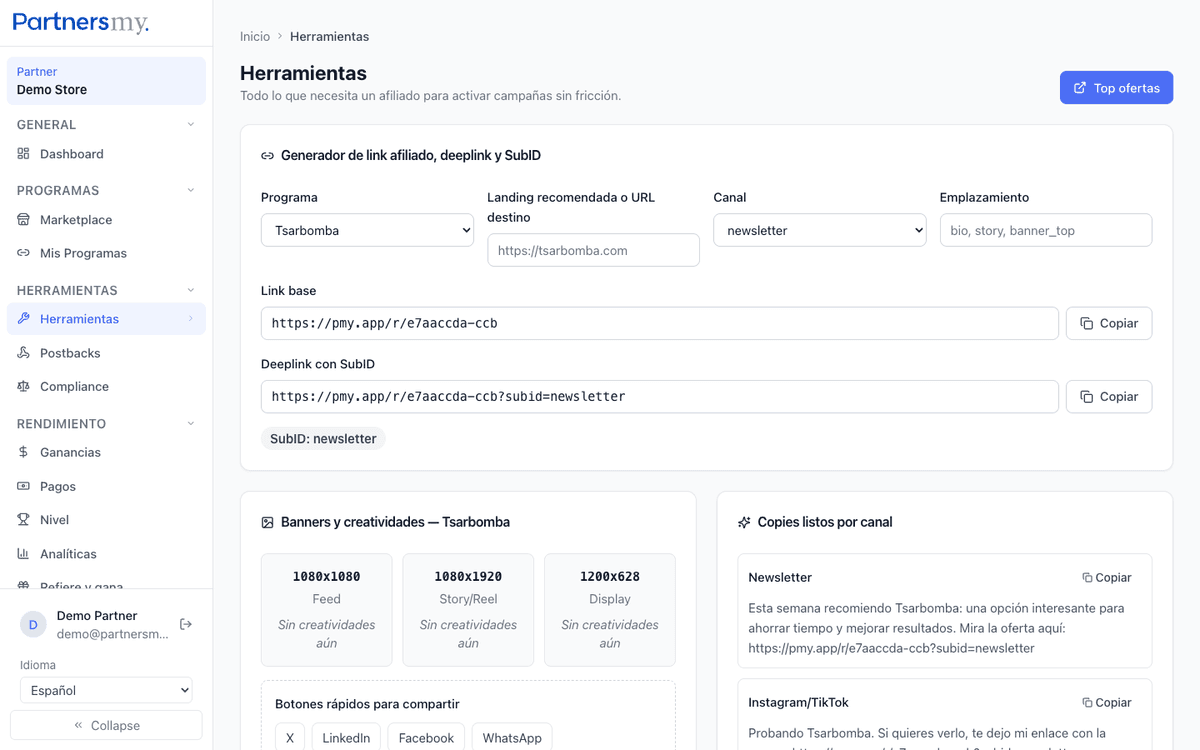
Generate the link

Use the link from your active partnership. If you integrate via API, call POST /v1/tracking-links with the program slug.

Each link includes your affiliate ID to attribute the conversion.

You can add UTM parameters to track specific channels.

Link generator
02

Do a clean test

Open the link in a private window and confirm it redirects to the correct landing page.

Use an incognito window to avoid interference from previous cookies.

Verify the final URL contains the tracking parameters.

Tracking redirect
03

Review events

Check unique clicks, signups, trials and purchases from the dashboard or via /v1/conversions.

Events may take minutes to appear.

Each event has PENDING status until the advertiser approves it.

Conversion events