
Join PartnersMy
The platform where brands and affiliates grow together.
Competitive commissions, real-time tracking and secure payouts. Everything you need to monetize your traffic or scale your affiliate program.
Join PartnersMy
Competitive commissions, real-time tracking and secure payouts. Everything you need to monetize your traffic or scale your affiliate program.
Commissions
What each status means, how to review amounts and how to get paid.
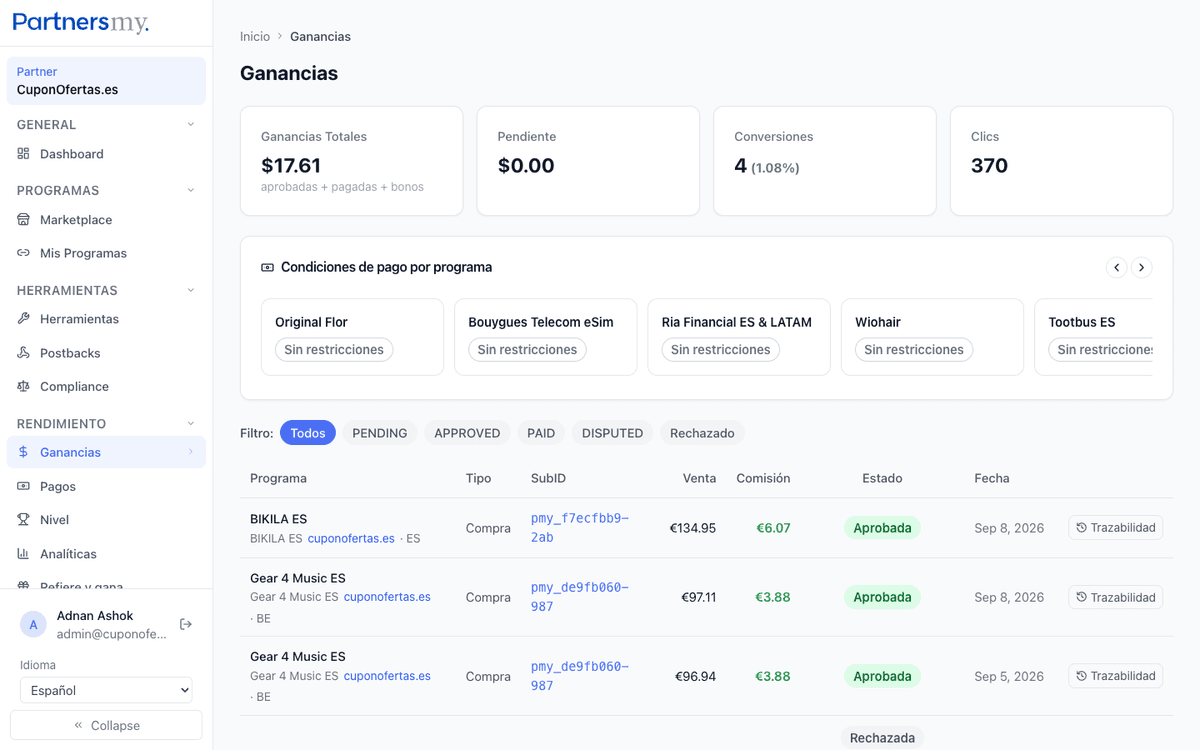
PENDING: commission registered and awaiting review by the advertiser.
APPROVED: the advertiser has validated the commission. It already counts as income.
PAID: the commission was already included in a processed payment.
REJECTED: the commission was rejected. You'll see the exact reason in its traceability and get a notification.
DISPUTED: the commission is under review due to a discrepancy (usually a return).
CHARGEBACK: the customer has requested a chargeback from their bank. The commission is reversed.
In Earnings, the «Traceability» button opens each commission's full history: every status change with its reason, who recorded it and when.
If a commission is rejected, the reason is on record — no opaque rejections here.
To dispute it, contact support quoting the commission ID: the traceability is your evidence.
The amount is calculated using the program's active rule (percentage of sale or flat amount).
If the partnership has a custom commission, that takes priority over the general rule.
Request your payout anytime from the Payments section: choose the method (Stripe, PayPal or bank transfer).
Each program publishes its payout minimum and its hold period (days from the sale until the commission is payable).
Fast-track: with a track record of approved sales, your payout enters the priority queue with a 72-hour target.
From the Payments section of the dashboard you can see all processed payments.
Each payment details the included commissions, total amount and processing date.